In this tutorial, i will be showing you (with pictures) how you can easily and conveniently connect your G6 Decoder to a wi-fi hotspot. Once you connect your g6 to the internet, you will be able to use your g6 with cccam, you will also be able to use the iptv / internet tv e.g youtube on your g6. To connect g6 with a wired network e.g (Lan) is pretty easy so i shall be involving myself with the more complex and technical aspect, that is how to connect g6 to a wifi hotspot.
The good thing about this is that, you can use either your phone as the wi-fi hotspot, use your computer as the wi-fi hotspot or use your company’s wi-fi as the hotspot.
 IMPORTANT PREREQUISITES:

- If you want to use your laptop as the WI-FI hotspots, i will advice you to download a pc software called connectify hotspot. This pc software, will convert your pc into a wi-fi hotspot as well as share your internet connection. If you have a good internet connection with connectify installed, you can use your laptop as a wifi hotspot,.
- Alternatively, you can use your phone as the wifi hotspot. It doesn’t matter the type of smartphone you use, all i know is that all high-end to middle range phones comes preloaded with wifi hotspots.. Phones like nokia lumina 920, Android phones, high-end blackberry phones like bold 5, bold 6, z10, q10, iPhone 4 and newer e.t.c…they all have a wifi hotspot pre-installed. iPhone call his, personal hotspot, android call his portable hotspots. To enable this features, in you respective phones, goto the network / wi-fi settings of your device.
- The third and the most important prerequisite is that you will need to buy a W-FI Adapter. This wi-fi adapter will be attached to your G6 as shown below, and it is what will equip your g6, with the capabilities of searching for and seeing a nearby wi-fi hotspot. In other words, without a wi-fi hotspot, your g6 or even qsat will not be able to search for a wi-fi connection. it will only scan for eternity. A picture of a wi-fi adapter that am using is shown below;
 Of couse i don’t need to tell you that you need an internet data plan. please don’t use all this 10mb free promo and don’t use your pay as you go airtime. Load a data bundle of not less than 100mb.

HOW TO SEARCH AN CONNECT TO WI-FI WITH G6;
On your remote, navigate to Menu>>Multimedia>>Network Settings. Here you will see the network interface of G6, by default, it is set to wired network (meaning lan) you will have to manually change it to wireless network as shown below;
 Now you will have to connect your hotspot. Remember if you are using a computer, you can create a wi-fi connection manually or do so via a very popular, easy to use pc software called connectify. It is even easier enabling the wi-fi hotspot on your phone, but the majo disadvantage of using wi-fi hotspot on your phone is on your battery another major advantage of using your phone as a wifi hotspot is that you can place your phone in a corner of your room where the network signal is at its best.
The next step is for you to search for available wifi network as shown below am using connectify pro and i name my wi-fi hotspot Ruchina-Networks;

 Once the wifi network is found, you can now click on the available wi-fi network and enter your password where required;
 Once connection is established, you can press exit and navigate to Menu>>Others>>here is where you can see internet tv like YouTube. I selected youtube and as you can see i was able to watch you tube videos(Note the speed of your internet connection play a greater role here, use 3g only.


HOW TO ACTIVATE YOUR CCCAM ON AZSKY G6;
Once you have successfully granted your G6 a wired or wireless internet connection, you may decide to watch your satellite tv with a cccam account instead of using the default azsky account. To enable cccam on g6 is very easy, simply press Menu>>Others>>Server setup>> then press okay to reveal the cccam interface.
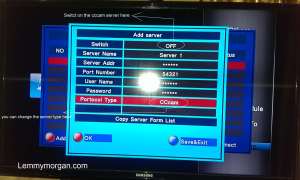 From the picture above, you will have to fill your cccam account details into the required field. You don’t need to change the protocol type if you are using a cccam account. After carefully inputting your cccam details, press your remote to switch on the account and press the corresponding button to connect your account (the button used in connecting cccam account should be blue or yellow) after that, exit at try your channels.
Note: You can buy a wi-fi adapter from most satellite / computer retail shops a software update that will add more internet / iptv will soon be rolled out for G6 Decoder.
thnaks mr LEMMY
WELL DONE BOSS AND HAPPY NEW YEAR;
please i just have a little problem by wich one i would like to ask your help. it is about those wifi adapters for receivers ; i want know if those wifi adapters come whith cd inside,because i searched in the computer market i only sow wifi adapter whith cd, those wifi can be used to connect to receivers?
thanks for your understanding and may almigthy bless you
@sibasimo you were searching for wifi adapter for a computer. Wifi adapters compatible with receivers is a plug and play adapter that requires no cd to work. Please search my article on compatible wifi adapter for iks decoders
hi lemmy , what type of wi fi adapter one must use, on x man g 8 as the ones available come with a CD
@SPEDRO, search the site for some names, but you can actually buy any wifi adapter that is compatible with your decoder
hi lemmy, i have x man g 8 receiver, shows data error on iptv, please assist
@use lan ibternet or wifi connection
thank you for enlightment, please how can i get cccam account for my decoder
which type or brand of wireless card can i fix to my Q-sat
Bonjour monsieur lemmy morgan! Je suis en R.d.congo à kinshasa, Azsky g6 decrypte seulement les chaînes de Dstv? Repond moi s’ il vous plaît
hi lemmy, please advise me what is the best relaible dstv dongle or combo that is in the market now.
@hassan azsky + qsat
Oga lemmy , i realy appreciates what u are doing , and may god continue to protect u all the days of ur life . Thnks so much for the answer u gave me .
Hi lemmy
what can i do coz my g6 has no network the data light just blink red
@Richmos you have only three options; 1. check your internal antenna that its not damaged, check your external antenna that it is not damaged, finally change your sim to an internet active non-blackberry sim card.
Good evng mr lemmy and how is the family ? Pls what could be the cause of the long delay on q-sat before opening channels ? And i hv tried all networks , waiting to hear frm u . Thanks so much .
@dosu, qsat server is getting over-loaded
Mr Lemmy I real appreciate your effort. I learnt a lot. I am from Tanzania and I’m using azsky G6. It is doing well except on HD channels.
@Matunyengule, no dongle is currently opening hd channels on dst* thanks
i just bought my qsat today,pls tel me more about ccam,its uses and functions
Hi lemmey,
How can i set the apn on azsky g6 .
@richmos, it is absolutely unnecessary
Good day mr lemmy,please how do i use my q11g decoder to watch mytv scrambled channels,pls enlighten me
@friday sorry qsat doesn’t support mytv packages
is there any decoder that can work with internet
@jaddo, rephrase your question
and how much does it cost ? will it last upto a year ? from your experience with cccam, what am i to expect in terms of service stability and disruption ?
@dino B,a cccam is stable when you get a good one. it ranges between 1month, three months , six months and 1year. however only the one of six months is popular in Africa
Mr Lemmy, thanx for the updated info. I will like to buy a year cccam account for my decoder. how do i go about it and whre do i buy from ?
Hi Lemmy can I share my qsat with my brother where we switch between channels without watching the same channel while we share. If yes how do I set it up?
@De Don No you can’t
i learnt there s a new version of connectify compactible with win xp and vista. True or false? B4 it was meant 4 only win7 and above. Thanks
@it is very possible, but i have never tried it on windows xp before
pls sir, how do i go about configuring my srt4922. If possible create a trade for it sir. I also learnt from ur post dat ‘ wifi hotspot can not worked in window xp and vista but when i was carrying my personal research, i find out dat dere is a version compactible with xp and vista, true or false. Thanks
pls sir, ist possible to use this method with srt4922 and co…thanks
@omaba yes
How can i activate my decorder receiver SCLASS S1000 to CCCam at 35.9 degrees east (EutelSat 36B), or what are the setting parameters, such as the IP Adress, the DNS SERVER and etc.
Thanks.
@TOM, am afraid i have not yet come across your typpe of decoder, however a cccam is easy to load on any compatible decoder.
Hello pple,
how much is Strong SRT 4950 and can it work wit Azsky dongle ?
Thanks.
Hi,lemmy
This richmos from zambia,I just bought a azsky G6 but it cant work in my country.What can i do please help me if you can than you
@ricmos keep using all the sim cards available in your country
what is the cost of ccam account atlantic 6months and how can someone connect external dongle to a G8 xman
@benny am not too conversant with xman g8, but you can read my post on how to use cccam on qsat
BRAVO. With all this explanation the Switch must be GPRS. SAT or TWIN
@ayinla, the switch has no bearing on it.
Thank you Lemmy for this wonderful article on connecting G6/IKS decoder to wifi hot sport. This has been my problem since I’ve been using my IKS decoder, because any time I try to connect my Q-sat 13g to my smartphone wifi hotspot, it has never gotten connected and I keep asking but no body tells me about the use of wifi adapter.
Lemmy, my question is, can the wifi adapter be connected via usb port or where?
@the wifi adapter is connected via the usb port on the decoder
I will like to know the latest price of g6 and how i can get it from you.
@Abel i don’t discuss price openly you can contact me if you are interested
Iam using qsat 13g why can i get a new account?
@Beni, you can get to buy one through me. contact me via email sir